Because of your generosity, Harriman Methodist is able to offer quality ministry to youth, children, and families as well as many other ministries and mission projects.
1. Online Giving with Zelle®
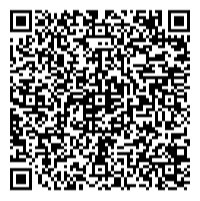
Already have a Zelle account? Scan the QR code above through the Zelle app with your smart phone from your computer or desktop, or access Zelle using your banking app from your smart phone and use this email address to send money: dknob503@gmail.com
Don’t have a Zelle account? You can likely use your bank’s website or app to set one up and follow the prompts to activate. Just add the recipient and email/contact information below. Most banking apps offer Zelle.
If your bank does not offer this option follow the steps below:
Follow additional prompts (if any).
Download the Zelle app through your device’s app store.
Create an account by following the prompts in the app
Enter the following
Account information or bank card tied to your account
Under “send to”, enter the following information
Recipient – Harriman Methodist Church
Email – dknob503@gmail.comc
2. By Mail
You can also give by mailing a check with your tithes and offering to the Church’s P. O. Box.
Harriman Methodist Church
P.O. Box 407 | Harriman, TN, 37748
*Please DO NOT send any payments to the physical